Your 'Always-On' Agent Should Sleep 99% of the Time: Building Anthropic’s 5 Primitives Locally
Almost everyone tinkering with AI agents eventually tries the same weekend project: hook a coding agent up to a cron job, point it at your repos and inbox, and call it a “24/7 personal assistant.”
By Tuesday morning, one of two things usually happens. Either it quietly died overnight because a login token expired and nothing told you, or it burned through half your quota pinging your phone four times about the exact same failing build.
A couple of days ago, William Hu at Anthropic published Building always-on agents, and the opening point immediately clicked: an “always-on” agent isn’t actually always on. Done right, it spends 99% of its life completely asleep at zero tokens. It wakes up for a short burst when something happens, writes down what changed, and goes right back to sleep.
The model loop inside is nothing exotic. What actually keeps a 24/7 agent from going off the rails are five pieces of plumbing around the model:
- An Event Inbox (so triggers don’t collide or vanish)
- Timers (both recurring schedules and alarms the agent sets for itself)
- Memory (including what it already told you, so it stops repeating itself)
- Permissions (safe background access + approvals that resume where they left off)
- A quiet-by-default Outbox
Anthropic’s guide sketches those five pieces for a cloud backend—Postgres tables, object storage, and HTTP credential proxies. Over in agy-hq—the open-source personal assistant setup I run every day on Google Antigravity (intro post)—I wanted those exact same five guarantees, without babysitting Postgres, Redis, Docker, or a cloud server just to organize my own life.
Everything in agy-hq compiles into a single zero-dependency Go binary on a Mac or Linux machine, keeping all personal notes, keys, and transcripts inside a git-ignored local/ folder. Comparing Anthropic’s cloud blueprint with our local setup is a fun tour of why naive cron-plus-prompt agents break—and how surprisingly far plain local files can take you.
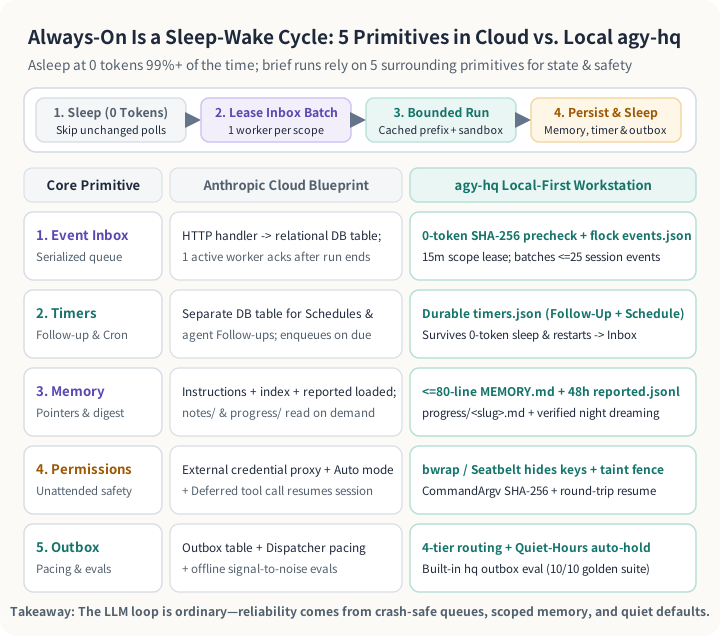
Same sleep-wake loop, opposite tech stack: swapping cloud databases and proxies for 0-token shell checks, file-locked local queues, and lightweight OS sandboxes.
1. Stop letting triggers poke the agent directly (and filter out no-ops at 0 tokens)
When you wire up your first background agent, the obvious shortcut is having every cron job or folder watcher launch the agent directly. That works right up until two triggers fire at the same moment and step on the same files—or a watcher moves an attachment out of your inbox right before the agent hits a rate limit, losing the file in limbo forever.
Anthropic’s fix is an Event Inbox: triggers drop work into a durable queue, only one worker touches a given scope at a time, back-to-back messages for the same chat get batched into one turn, and an item is marked done only after the agent finishes cleanly.
In agy-hq, a file-locked JSON queue (local/memory/events.json) gives us that exact crash safety on disk without running a database server. Dropping a PDF into local/inbox/, receiving a message, or firing a local Git hook all line up cleanly in the same queue and retry automatically if a run gets interrupted.
Running on a personal machine also inspired one extra layer in front of the inbox. Cloud apps get push webhooks; a desktop often has to poll. Waking up an LLM every five minutes just to read "0 new messages" is pure waste. So before a recurring watcher even creates an event, hq runs a quick shell check and hashes the output. If nothing changed, it goes straight back to sleep at 0 LLM tokens—while tracking broken checks separately so an expired login shows up as a warning on your status board instead of looking like a quiet morning.
2. Not every timer is a cron job
Here is a subtle trap I didn’t appreciate until building background workflows: schedules and follow-ups are two completely different animals.
- A Schedule is a routine you set up front, like a
7:30 AMmorning brief or an11:30 PMmemory cleanup. - A Follow-up is a one-time alarm the agent sets for itself in the middle of a task—like kicking off a staging deploy and saying, “Wake me up in 25 minutes to check if healthchecks stayed green.”
If an agent sets an in-memory timer inside a chat thread, that alarm disappears the moment the background worker exits—or whenever your desktop app restarts overnight.
In agy-hq, agents can drop a one-shot follow-up onto disk (./bin/hq timers set --in=25m ...) and immediately exit to 0 tokens. When the 25 minutes are up, the background daemon doesn’t even spawn a model directly—it just drops a wakeup event into the Event Inbox pointing back at that saved session, getting locking and crash retries for free.
3. Memory that doesn’t nag you twice—or blow your prompt cache
Anyone who has run a scheduled agent has hit the “broken record” problem.
At 9:00 AM, a background check spots a red build and sends you: “PR #42 CI Failing.” At 2:00 PM, a fresh run wakes up, sees the same broken build, and sends: “CI Failure on PR #42.” Simple title matching misses the rewording, and because the two runs don’t share short-term memory, your phone buzzes twice for old news.
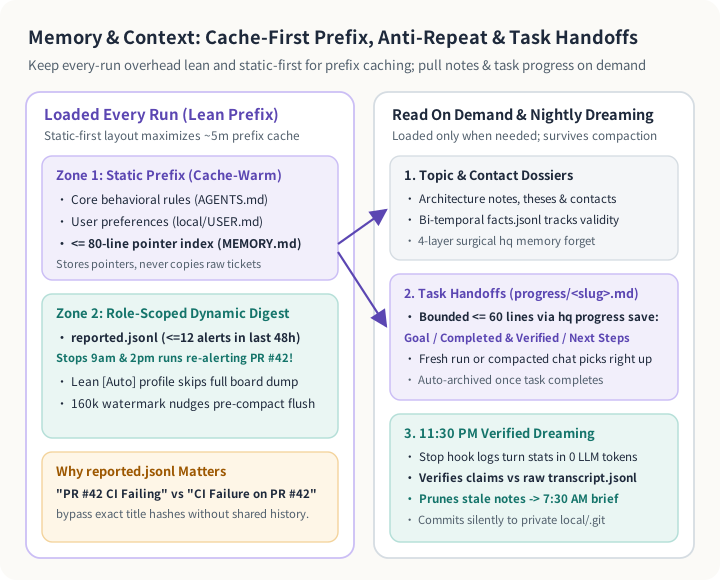
Static rules sit at the top of the prompt to keep caches warm, a short reported log stops repeat alerts, and task handoffs plus nightly log checks keep long projects on track.
Anthropic’s guide nails the fix: alongside user preferences and a tiny pointer index (<= 80 lines in agy-hq, pointing to deeper topic notes only when needed), load a short log of what the agent already told the user. Passing along the last dozen delivered alerts from the past 48 hours (reported.jsonl) immediately cured duplicate nagging for us.
Two other memory habits make a huge difference in daily cost and reliability:
- Put static files first so prompt caching actually works: Keeping unchanging rules and
MEMORY.mdat the very top of every startup prompt—and giving narrow background jobs a stripped-down startup context—keeps recurring wakeups cheap. - Write handoff notes before compaction, and fact-check at night: Long tasks save short
<= 60-line handoff cards (progress/<slug>.md) before context compaction summarizes old turns away. Then at11:30 PM, a silent “dreaming” pass cross-checks the day’s summaries against raw tool logs so hallucinated wins never sneak into long-term memory.
4 & 5. Approvals that resume—and an Outbox that knows when to stay quiet
Giving an unattended agent access to your machine and accounts is scary for two reasons: you don’t want a stray script reading ~/.ssh, and you don’t want an eager agent sending external messages without asking.
At the same time, most approval flows in DIY agents are annoying dead ends. Suppose your agent drafts a reply to a colleague and pops up an Approve / Reject prompt on your phone. You tap Reject and type: “Push it from Tuesday to Thursday at 2pm.” In a naive setup, rejecting the command just kills the action—nobody wakes the sleeping agent back up to actually rewrite the draft!
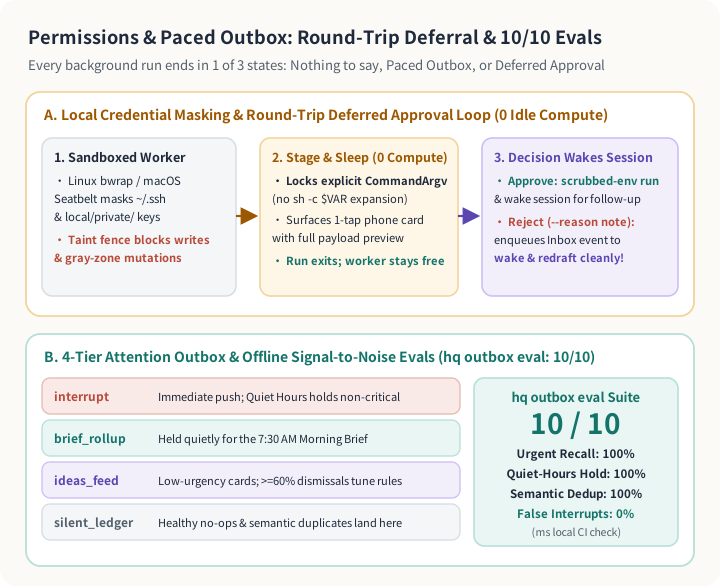
OS sandboxes hide private keys, SHA-256 phone approvals loop rejections right back into the Event Inbox to redraft, and hq outbox eval tests notification rules in milliseconds.
Following Anthropic’s Deferred Tool Call and Outbox patterns made the whole loop feel seamless on a local machine:
- Hide private keys at the OS level (zero Docker required):
./bin/hq exec-sandboxeduses Linuxbwrapor macOS Seatbelt (sandbox-exec) so background scripts literally cannot see~/.sshorlocal/private/. And any session that opens an untrusted attachment gets tagged as tainted, blocking file writes and sneaky outbound commands. - Round-trip
SHA-256phone approvals: Outbound commands lock an explicit argument list (no$VARshell-expansion surprises) to aSHA-256hash and pause at0compute. When you tap Approve—or Reject with “Change it to Thursday at 2pm”—your choice drops an event right back intoevents.json, waking that sleeping chat up to revise the draft or log a follow-up reminder automatically. - Start quiet, and regression-test your Outbox: Most background checks should say nothing at all. Everything else gets sorted into four buckets: true
interruptalerts (held automatically during Quiet Hours unless critical), a single7:30 AMmorning rollup, a low-priority ideas list, or a silent log. We even added a 10-case sanity suite (./bin/hq outbox eval) that runs in milliseconds to verify0%false interrupts and100%duplicate suppression whenever we tweak notification rules.
Does leaving it on 24/7 eat your quota? Real numbers across 1.51B tokens
Whenever people hear “always-on personal agent,” their first instinct is understandable: won’t background polling quietly drain my quota while I sleep?
Because agy-hq includes a zero-token log parser (./bin/hq obs), I pulled the actual numbers across my live workspace—186 real sessions, 31,296 model steps, and 1.51 billion gross tokens (92.0% overall prefix-cache hit rate):
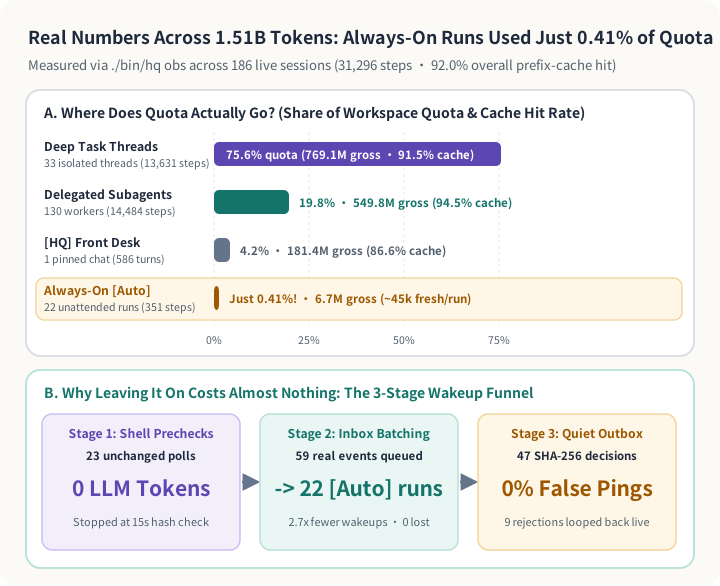
Measured across 1.51B real tokens: 99.6% of quota went into real interactive tasks, subagents, and Front Desk chats—leaving agy-hq running in the background used just 0.41%.
Three numbers tell the whole story:
- Background
[Auto]runs used just0.41%of total quota: Out of1.51Bgross tokens across the workspace, all22unattended background runs combined accounted for only6.7Mgross tokens (~45kfresh input tokens per run)—while75.6%went to deep coding/research threads and19.8%went to delegated subagents (94.5%cache hit). 0-token prechecks + inbox batching cut out wasted wakeups:23unchanged polls stopped right at the15-second shell hash check for0LLM tokens, and59real incoming events coalesced cleanly into those22background runs (2.7×fewer wakeups,0dropped events).- Round-trip approvals actually get used: Out of
47hash-locked outbound prompts,9rejections looped feedback right back into the queue to redraft automatically instead of hitting a dead end.
Two honest trade-offs of skipping the cloud
Running all five primitives on your own hardware feels wonderfully snappy and private, with two obvious physical realities:
- Closed laptop lids pause the clock. On an always-on Mac mini or Linux desktop, schedules fire on the dot. On a laptop asleep in your backpack at
7:30 AM, due jobs wait patiently on disk until you open the lid—nothing gets lost, just delayed. - OS path sandboxes aren’t full cloud VMs.
bwrapand Seatbelt hide your keys and private vault folders with zero setup, though locking down local network ports still takes extra firewall rules if you run untrusted code.
The biggest takeaway from reading Anthropic’s guide alongside our own codebase is reassuring: when a proactive agent feels flaky—dropping tasks, double-pinging you, or forgetting to check back—it’s almost never because the model isn’t smart enough. It’s almost always one of these five surrounding pieces missing around it.
Try it in 60 seconds (or steal the parts you like)
If you’re building on Google Antigravity—or hacking on your own local always-on agent and want to borrow a file-locked event inbox, self-set timers, reported.jsonl dedup, or the zero-dependency Go hook setup—the entire workspace is open source (Apache 2.0) at github.com/zjshen14/agy-hq.
You can spin up a pre-loaded --demo sandbox on macOS or Linux in under a minute to click through the task board, inbox quarantine, and SHA-256 approval flow without touching any of your real files:
git clone https://github.com/zjshen14/agy-hq.git && cd agy-hq
./scripts/bootstrap.sh --demo
./bin/hq outbox eval
If you give it a spin—or have your own tricks for keeping background agents quiet and reliable—drop by the GitHub repo or open an issue. Always fun comparing notes with other people building daily-driver agents!
Curious about the exact CLI commands, file paths, and test numbers?
Prepared with AI assistance. References William Hu’s Building always-on agents (Anthropic, November 13, 2026) alongside github.com/zjshen14/agy-hq as of November 15, 2026. Diagram figures are recorded in summary.json.
- Event Inbox (
local/memory/events.json):pending→leased→done/droppedqueue guarded by ordered advisoryflock(local/memory/.events.lock), archiving toevents_archive.jsonl. Defaults:15mper-scope lease TTL, up to5retries, up to25batched events per session turn, and15s0-token shellprecheck_cmdchecks with separate error tracking. CLI:./bin/hq events <enqueue|list|inspect|retry|drop|dispatch|token>. - Timers (
local/memory/timers.json): Supports agent-set one-shotfollow_updeadlines (>= 1mhorizon, up to50active) alongside recurringscheduleentries fromlocal/triggers.yaml, enqueuing intoevents.jsonwhen due. CLI:./bin/hq timers <set|list|cancel>and./bin/hq triggers <list|pause|resume|fire>. - Memory (
local/MEMORY.md,reported.jsonl,progress/): Static-firstSessionStartordering for prefix caching plus a lean profile for[Auto]background runs;<= 80-lineMEMORY.mdindex;reported.jsonl(72hretention, injecting up to12delivered alerts from the past48h);<= 60-line task handoff files via./bin/hq progress <save|show|list|archive>;160k-token compaction watermarks; and11:30 PMtranscript-verifiedsleep-consolidate. - Permissions & Outbox (
bwrap/sandbox-exec,hq propose,hq outbox eval):./bin/hq exec-sandboxed [--net-isolated] -- <cmd>masks~/.sshandlocal/private/. Proposals (24hTTL,>= 8-hexSHA-256prefix) bind explicitCommandArgvarrays under a scrubbed env and resume sleeping sessions viaevents.jsononapprove/reject --reason../bin/hq outbox evalverifies10/10golden routing cases (100%urgent recall,100%quiet-hours hold,100%semantic dedup,0%false interrupts), backed by38end-to-end sandbox workflow tests (go test ./internal/e2e). - Live Workspace Telemetry (
./bin/hq obs tokens -since=all -by=kind): Across186conversations (1,346turns,31,296steps;1,507,060,386gross tokens =1,377,191,631cache_read_tokens+119,935,963input_tokens+9,932,792output_tokens;92.0%overall cache hit), quota share split into75.6%deep task threads (33threads,91.5%cache),19.8%delegated subagents (130workers,94.5%cache),4.2%[HQ] Front Desk(586turns,86.6%cache), and0.41%[Auto]background runs (22runs from59queued Inbox events,6,734,349gross /982,905fresh input,230-token shell precheck skips,47outbound human approval decisions).
Scan with WeChat
Scan this QR code with WeChat to read or share on mobile.